
Soporte mSecure
Important Security Notice 2026-11-03
@Corrado
From some rudimentary digging in the web if you want your Mac and iPhone to synchronise automatically whenever they're on the same home Wi-Fi, KeePassium isn't quite as straightforward as you might hope. That info might be out of date as I don't use it,
How have you found Keepassium local auto sync on yr local network across devices?
The syncing across devices via a cloud service is exactly what went wrong with msecure. THAT is the weak spot and they never should have started to offer this. Especially not towards the Apple ecosystem, where the much safer iCloud is available. And indeed, as many here said and in many news reports is asked: where vaults unknowingly to msecure users in any point of time synchronised with the msecure cloud? Even if this option was disabled in the app?
Once again: no thief can do anything with ‘only’ a stolen database of hashed passwords or ‘only’ a bunch of stolen vaults. The combination is dangerous. It is deadly when msevure didn’t encrypt user master passwords at all.
But I start to have the feeling that they just see all our worries in their forums as some form of entertainment and that no one there really cares at all anymore.
The silence of msecure gave us at least a huge amount of stress, we still don’t know what to do because there is nothing we can base our actions on. Meanwhile the clock is ticking. I wish the msecure team a nice and peaceful weekend though. Sigh.
@Eltoro
both Keepassium and Strongbox seem to have been validated by the same German authority, so I think it's just a matter of understanding if the paid tool has better features, I'll test both and compare, as you're doing.
I don't sync the multiple devices "over Wi-Fi", I have saved the vault file on my NAS on a separately accessed share: the laptop has direct access to it as a regular file in a folder, while the phones connect to the NAS via WebDAV protocol (that I have enabled on the NAS). I have a strict access control to the Vault share on the NAS, checking both the connecting devices and the logon users, and adding a new client or user requires admin approval with dual factor authentication via an authenticator app, so nobody can get access to the WebDAV connection even if they get access to my home network. Of course, nothing is unbreakable, but this is as far as I can go without becoming impractical to use.
If nothing else, we ignored users perhaps could at least help to suggest fixes.
This is my suggestion for fixing the mSecure website... on the page which lists all the features
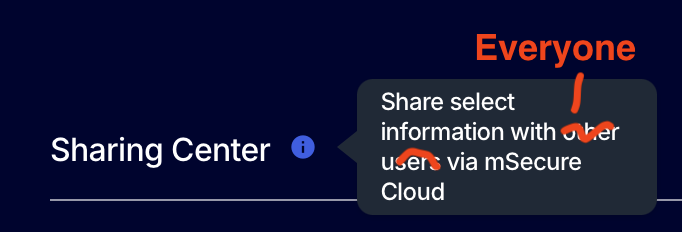
There is their answer we all have been waiting for, so non-cloud users are safe.

@Ron Actually, this is not a global broadcast and does not add anything to what they already replied to all the users who contacted the support: "Please note, this issue only pertains to users that were synching with the mSecure Cloud.".
I think an official, global email should be sent to ALL USERS in order to clearly and exaustively describe who has been affected.
@Maurizio
I have to agree.
I have to say that the team at mSeven has right royally screwed the pooch with this. So, they'd rather drop a response that we've all been looking for into a Facebook comment, rather than clearly communicate via email, or through these forums, or through public statements with their customers, past and present.
This will become a case study in how not to do crisis management as a business.
Had they come out with something a couple of days ago, then I - and by the look of it, a lot of others - wouldn't have spent time researching and moving their information to competitor solutions.
It's a shame, as I've always advocated the use of mSecure. It is now impossible to do that. And it's less about the breach; it's more about the fact that mSeven has undermined my trust in them. When I read the posts here (and on Facebook and elsewhere), that's the impression I get from a lot of other people.
Hopefully, the mSeven team will learn from this, and in their next business they won't make the same mistake,
Matthew
This seems ominous:
Given the potential security implications, mSeven recommends that you immediately take steps to protect all confidential information stored within the mSecure password management application. This may include changing passwords, resetting or re-enrolling two-factor authentication methods, or removing existing passkeys.
500+ passwords, lot of changing. This will require a triage.
re-enrolling two-factor authentication methods? just for msecure, or every account referenced within msecure?
all passkeys that I use?
all passkeys that I use on devices that has msecure installed?
just the passkey to access msecure?
If I perform these recommendations, and use the current version of msecure to manage these changes, what risks are the security implications?
32 personas tienen esta pregunta